

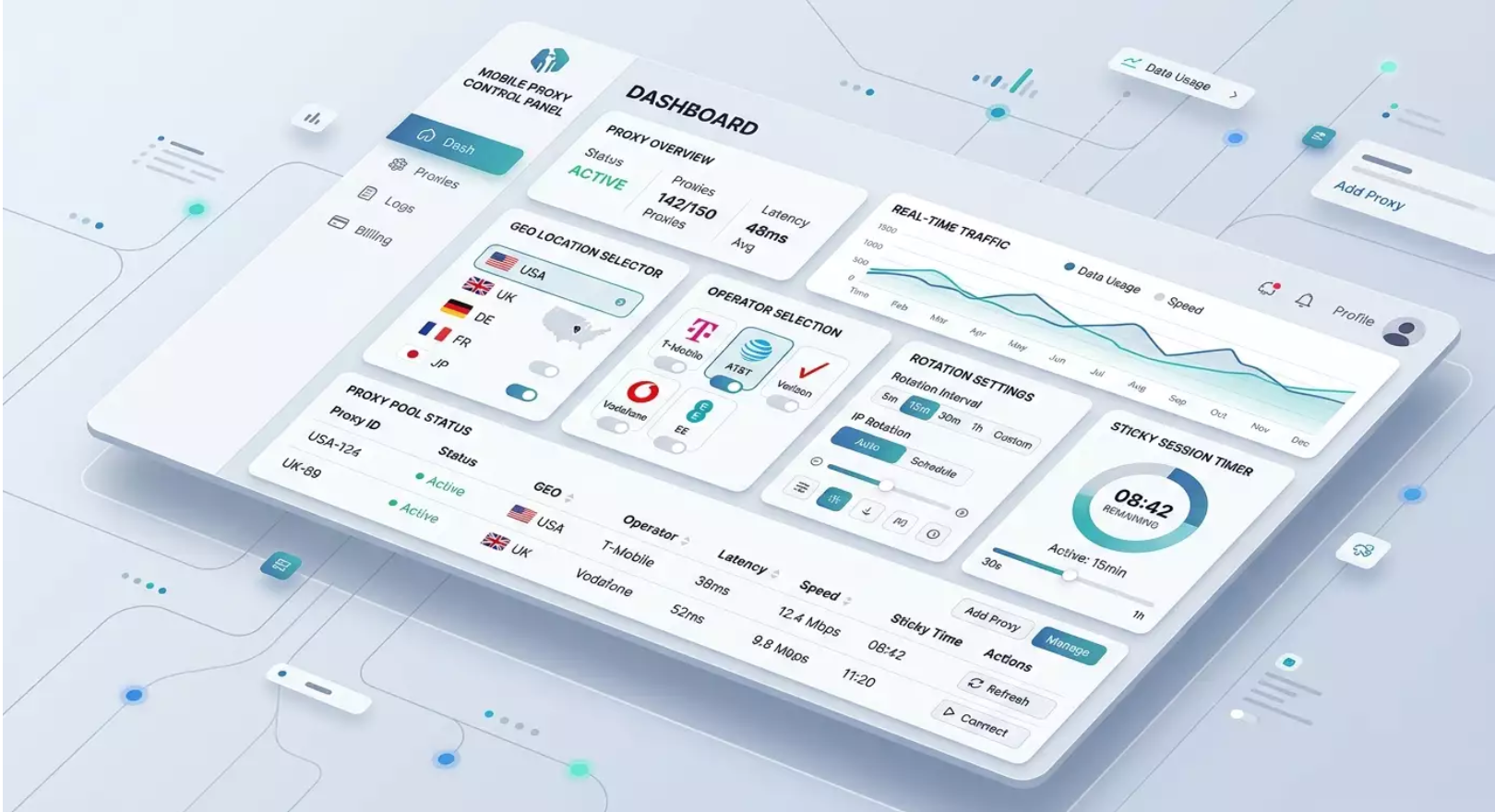
MobileProxy.Space has become the de facto standard for tasks where connection trust, mobile IP reputation, and stable sticky sessions are essential. In 2026, marketing, analytics, and mobile experience quality are closely tied to how a platform perceives your device and network. Mobile proxies allow careful, manageable testing, research, and scaling with predictable outcomes.
Introduction: What Problem Does the Service Solve?
The typical business challenge in 2026 is straightforward: digital platforms rely on signals from mobile networks. These signals determine the prices you see, which ads are displayed, and how fraud prevention systems treat your sessions. Data-center IPs are increasingly flagged as automated, while ISP home networks don’t always provide the necessary geography, stability, and mobile reputation nuances. MobileProxy.Space addresses this with real mobile IPs, managed rotation, and a wide selection of geolocations and carriers. As a result, you test and analyze the system in its authentic mobile context: honest latency, traffic profiles, and address variability.
We'll dive deeper into how to use the service in practice, covering everything from SMM and multi-accounting to SEO scraping, mobile ad verification, marketplace analysis, mobile app QA, and building a resilient Telegram infrastructure. For each case, we'll provide a step-by-step algorithm, metrics, tips, and mistakes to avoid.
Service Overview: Key Features and Benefits
Real Mobile IPs. Sessions are routed through carrier mobile networks. This increases platform trust in your traffic and helps accurately reproduce mobile scenarios.
Managed Rotation. IP rotation modes manual, by timer, via API, and on events. Sticky sessions last for several minutes or more for stable operation without interruptions.
Geography and Carriers. Choose countries and cities, select mobile operators, and fine-tune segmentation for local checks and tests.
Flexible Authentication. Through login and password or IP binding. Convenient for individual employees and team collaboration within subnets.
Integrations. Compatibility with anti-detect browsers, HTTP(S) and SOCKS5 clients, RPA tools, and automation frameworks like Playwright and Selenium.
API for DevOps. Create and manage sessions, request rotation, retrieve statuses, metrics, and logs. Suitable for CI tasks and analytic pipelines.
Performance. Routing optimized for mobile loads, normalized latency, stable sticky sessions, and sufficient bandwidth for scraping and testing.
Simple Dashboard. Sections include Personal Account, Proxies, Rotation, Profile, Team, and API Keys. Clear logic for session setup and monitoring.
Overall, MobileProxy.Space focuses on real mobile experiences rather than theoretical emulations. This is crucial for experiments as well as routine production processes.
SMM and Multi-Accounting on Social Media: Stability, Warm Sessions, Risk Management
Who Is It For and Why?
Suitable for SMM agencies, in-house teams, and content creators working with multiple profiles on social networks and messengers. The goal is to manage projects steadily with maximum platform trust in sessions and minimal protection triggers.
Step-by-Step Usage
Select Geography and Carriers. In the Proxies section, choose the country, city, and carrier most relevant to your audience. Geographic consistency is vital for local campaigns.
Set Up Authentication. In the Profile section, specify login and password access or bound IP. For teams, subnet binding is convenient.
Create Profiles in Anti-Detect Browser. Prepare a separate profile for each client or project. Enable WebRTC leak blocking and set mobile User-Agents.
Sticky Sessions. In Rotation, set the interval between 30 and 90 minutes. For stories, live broadcasts, and video uploads, it’s advisable to keep the IP within one session.
Warm Actions. Limit activity for the first 3-7 days: 10-20 likes per day, 3-5 comments, 1-2 posts. Gradually increase volumes by 10-20% every 2-3 days.
Monitor Device Signals. In the browser profile, save consistent screen resolution, timezone, and language. A mobile network plus a stable fingerprint creates a reliable trust signal.
Rotation Schedule. Rotate IP during off-hours and avoid sudden changes during activities. If necessary, trigger rotation via API after completing a task block.
Example with Results
An agency managed 24 accounts for three markets. After switching to MobileProxy.Space, the share of login checks dropped from 38% to 11% over four weeks. The conversion from promo launches to applications increased by 14% due to accurate geographic ad segmentation and predictable sessions. The average lifespan of profiles without additional verification increased to 90 days.
Tips and Best Practices
One Project — One Profile — One Proxy. Eliminate overlapping fingerprints and IPs between clients.
Scheduled Rotation. Change IP during low-load periods. Do not combine rotation with mass publication.
Speed Control. Mimic human rhythm: delays of 3-6 seconds between actions, pauses of 10-15 minutes between blocks.
Common Mistakes
Rotate IP too frequently on a young account. The result is additional checks and restrictions.
Mix working users in the same browser profile. Fingerprint collisions occur.
Ignore the timezone and interface language. Inconsistency in signals increases the risk of additional verification.
SEO Scraping and Competitive Analytics: Mobile SERP and Behavioral Factors
Who Is It For and Why?
SEO agencies, product teams, and content teams researching mobile SERP, snippets, local relevance, and recommendation blocks. Mobile proxies provide an accurate picture of SERP and personalization for mobile traffic.
Step-by-Step Usage
Proxy Pools. In the Proxies section, create a session pool for target search regions. For each area, aim for a minimum of 10-20 simultaneous sessions.
Sticky for Parallelism. In Rotation, set the mode for 15-30 minutes. Sticky helps capture SERP without geographic jumps.
Client Setup. Specify HTTP or SOCKS5 proxies in your scraping framework. For Playwright, enable mobile User-Agents and viewports for smartphones.
Rate Limiting. Set query intervals and jitter. For 20 streams, use 300-600 milliseconds delay with randomization.
API Rotation by Events. After finishing a block of queries, trigger rotation via API. This reduces the risk of repeated patterns.
Metric Collector. Save HTTP codes, latency figures, and snippet visibility. Compare with desktop SERP.
Example with Results
The team collected mobile SERP data for 4 countries, using 2200 keys per day over 24 streams. The accuracy of recognizing recommendation blocks increased by 19% compared to data-center IPs. The stability of sticky sessions ensured a 97% completion rate for scenarios without repetitions. Based on the data, they adjusted metadata and microformatting, resulting in an 11-16% increase in snippet CTR over 6 weeks.
Tips and Best Practices
Deduplicate Cookies. Store cookies separately for each region. This stabilizes local results.
Randomize Query Order. Do not process keys alphabetically or by frequency. Shuffling reduces pattern repetition.
Balance Across Pools. Separate projects across different proxy pools to prevent noise from one niche affecting another.
Common Mistakes
Use the same HTTP headers for all streams. This increases uniformity in patterns.
Neglect to track responses with CAPTCHAs. It's better to slow down and suspend the pool.
Utilize too-short sticky sessions. The output becomes inconsistent.
Mobile Ad and Creative Verification: Honest Displays and Geolocation
Who Is It For and Why?
Marketers, media buyers, and brand safety specialists. The goal is to view ad blocks as a real mobile network user would, compare placements by city and carrier, and capture loading speeds and creative quality.
Step-by-Step Usage
Select Target Geo. In Proxies, choose cities for the campaign. For A/B testing, create separate proxies for each creative group.
Setup Environment. Use a mobile browser emulator or a real device connected via proxy. Configure identical devices for comparability.
Sticky Sessions of 45-60 Minutes. Track retargeting and viewing sequences. Record a chain of 3-5 sessions.
Viewing Scenarios. Scrolling through feeds, searching for brand and generic queries, viewing product cards. Gather evidence: screenshots, HAR files, time metrics.
API Rotation Between Waves. For each wave, use multiple cities and carriers. After completing a wave, rotate and move to the next.
Example with Results
The media team compared 8 creatives across three cities. Mobile SERP showed up to a 27% variance in exposures across carriers. After swapping heavy videos for optimized versions, TTI decreased by 1.2 seconds, and above-the-fold visibility increased by 15%. The outcome was a 9-13% reduction in cost per click.
Tips and Best Practices
Consistent Bandwidth. Compare creatives using the same network and device. Otherwise, it increases variance noise.
Separate Pools. For retargeting and cold traffic, use different proxy pools.
Step Log. Log every screen step. This speeds up post-mortem analysis.
Common Mistakes
Changing carriers and devices mid-experiment. The data becomes incomparable.
Insufficient session length. Retargeting and frequency caps fail to identify issues.
Marketplaces and E-commerce: Accurate Positioning, Pricing, and Product Cards
Who Is It For and Why?
Sellers and agencies working with marketplaces and e-commerce stores. Mobile traffic is dominant. It's crucial to verify prices, visibility of listings, and product card visibility from a mobile user's perspective while analyzing the competitive environment.
Step-by-Step Usage
Geo and City. Choose a city with a high sales share. This is critical for local listings and logistics.
Sticky for 20-30 Minutes. This is enough for searches, filters, and viewing multiple cards as well as proceeding to the cart.
Verification Scenarios. Search using brand and product keywords, apply filters, compare prices, view photos and reviews, add to cart. Record CTR and positions.
Scrape Display Cases. Collect structured data for the first 50-100 cards based on the query. Utilize parallel streams with different proxies.
Segmentation by Carriers. Sometimes platforms rank differently with different carriers. Test hypotheses with separate pools.
Example with Results
An electronics brand checked listings in two capitals and four major cities. The average position across 30 keywords differed by 2.1 positions between cities and by 0.8 positions among carriers. After optimizing titles and first photos, the average position improved by 1.4 points, snippet CTR increased by 10%, and the share of mobile cart additions rose by 8%.
Tips and Best Practices
Peak Hours. Compare listings during peak and slow hours. Algorithm behavior may differ.
Variability of Photos. Test different first images and their scale on a mobile screen.
Personal History. For A/B tests, maintain separate cookies and search histories under different proxies.
Common Mistakes
Experiment without device control. Different screen sizes affect perception and behavior.
Use rotation mid-transaction. The session collapses, distorting metrics.
Mobile App QA: Testing API and UX on Real Mobile Networks
Who Is It For and Why?
Quality teams, developers, and product managers. Real mobile networks reveal edge cases: jitter, micro-disconnections, queuing at the operator level, CDN balancing.
Step-by-Step Usage
Integration via System Proxy. Set up a mobile device or emulator through the MobileProxy.Space SOCKS5 HTTP proxy.
Scenario Set. Registration, authentication, lists, cards, media uploads, payments, push notifications, repeat visits. Record latency, codes, and errors.
Sticky and Rotation. Perform functional tests on sticky sessions. Launch stress tests separately with rotation to verify client-server logic resilience.
Limits and Retries. Check exponential backoff correctness during outages and timeouts.
Metrics. First-screen time, TTI, fault-tolerant transitions, media stability, robustness of payment scenarios.
Example with Results
A marketplace application faced rare 504 errors on media endpoints. Tests via MobileProxy.Space revealed a correlation with specific carriers and traffic peaks. The team implemented progressive image quality degradation and client-side caching. Errors dropped from 2.3% to 0.4%, and median TTFB decreased by 180 milliseconds.
Tips and Best Practices
Capture HAR. Analyze the sequence of requests, codes, and redirects.
Test Payments. Ensure the accuracy of 3DS and redirects under mobile network conditions.
Simulate Weak Networks. Combine proxies with bandwidth and delay limiters.
Common Mistakes
Tests only on Wi-Fi and data-center IPs. Mobile traffic reality cannot be replicated.
Dependence on one CDN endpoint. Under load, degradation is only apparent on the mobile network.
Telegram Infrastructure and Team Collaboration: Load Distribution, Reliable Sessions
Who Is It For and Why?
Community managers and tech teams managing multiple Telegram projects. Tasks include moderation, publishing, analytics, and bot integration processes. Ensuring predictable sessions and load distribution is essential.
Step-by-Step Usage
Pools by Project. In Proxies, create separate pools for each community and bot. This separation reduces signal overlaps.
Sticky Regimen. For publishing and moderation, sticky sessions of 60-90 minutes are convenient. Plan rotations between task waves.
IP-Based Authentication. For integration servers, IP binding simplifies access control.
Rate Limit. Set the bot's request frequency. Avoid spikes and plan queues.
Monitoring. Record latency, errors, and response times. If errors rise, switch pools or trigger API rotation.
Example with Results
The moderation team distributed tasks among three pools: news, support, and integrations. After implementing MobileProxy.Space, the failure rate during batch publishing dropped by 35%, operator response times stabilized, and the average session lifespan increased by 1.7 times.
Tips and Best Practices
Clear Role Separation. Moderation, publishing, and integrations should use different pools.
Scheduled Rotations. Sync them with the content schedule.
Failover. Having a backup pool for network anomalies is good insurance.
Common Mistakes
Using one proxy for all participants. Conflicts and session instability arise.
Peak activities without queuing. Unnecessary errors and repetitions occur.
Price Analytics and Competitor Showcase Monitoring: Stable Data Collection
Who Is It For and Why?
Analysts and category managers conducting regular price, inventory, and assortment data collection on mobile showcases and legal public sources. Mobile proxies stabilize access and streamline data collection.
Step-by-Step Usage
Task Scheduler. Launch data collection every 6-24 hours, breaking it down by time to avoid overloading sources.
Regional Proxy Pools. For each region, use its own proxy pool and unique cookies for predictable localization.
Header Control. Imitate mobile browsers, ensure an honest viewport. This is crucial for loading mobile versions of pages.
Sticky for Batch Pages. Do not change IP mid-cycle for cards in one category.
Error Hygiene. Repeat attempts, backoff strategies, HTTP code and time metrics logging. If 429 errors spike, slow down and reschedule tasks.
Example with Results
The category team collected 480,000 cards in a week across 6 regions. The percentage of valid cards increased from 91% to 97% after switching to MobileProxy.Space and applying the correct sticky scheme. Price anomalies were identified 22% faster due to a uniform schedule and improved mobile showcase access.
Tips and Best Practices
Prioritization. Launch critical categories at the start of the time window when the network is stable.
Metrics. Review rate limits and timeouts every sprint.
Visual Diffs. Take screenshots of mobile cards for quick comparisons of changes.
Common Mistakes
Random rotations in the middle of a long category. This results in loss of consistency.
Uniform frequency for all sources. Different platforms require different limits.
Technical Integration and Automation: API, DevOps, and Quality Control
Quick Start
In your Personal Account, create an API key in the API Keys section.
In Proxies, form a pool, configure rotation, and set sticky.
Connect HTTP or SOCKS5 to your application or anti-detect browser.
Add API calls for event-based rotation and status retrieval.
Enable request logging and latency metrics in your collector.
Reliability Recommendations
DNS Cache. Stabilizes name resolution in mobile network conditions.
Pools and Prioritization. Separate production, staging, and experiments into different pools.
Observability. Track proxy SLA, error rates, and median delays. Respond to trends rather than individual spikes.
Security and Compliance
Authentication. IP binding and role-based access for team members in the Team section.
Data Segregation. Different pools for different clients and projects. Clear logging.
Ethics and Adherence to User Agreements. Operate within user agreements and regulations. Adjust frequency and volume settings to fit platform limits.
Comparison with Alternatives: Why MobileProxy.Space Wins
Against Data-Center IPs. Mobile IPs are perceived as traffic from real users, triggering fewer protective alerts and providing a genuine mobile UX. DC pools are often flagged as automated.
Against Static Residential IPs. Mobile rotation and network reputation enhance resilience to false alerts. Residential proxies are good for some tasks, but mobile signals are closer to real behavior.
Against Random Mobile Pools. MobileProxy.Space features managed rotation, sticky sessions, geolocation options, a transparent dashboard, and API, which are critical for reproducibility in experiments.
Team Collaboration. IP binding, role-based access, and proxy pool segmentation allow for safe scaling.
Observability. Session statistics, latency, and error data help maintain quality control.
FAQ: 10 Practical Questions
1. How to Choose a Rotation Interval?
For SMM and moderation, use 45-90 minutes. For scraping — 15-30 minutes. For QA — according to the test scenario, usually stickiness during case time.
2. What Is a Sticky Session?
It’s a mode where the IP is held for you for a specified time. Convenient for sequential scenarios.
3. How to Connect an Anti-Detect Browser?
Create a profile, enable mobile User-Agent, disable WebRTC leaks, set proxy login/password or bind by IP. Sync rotation with action schedules.
4. How Many Streams Can Be Run?
This depends on the tariff and scenario. For stability, start with 5-10 streams per pool, gradually increasing as error and latency norms are attained.
5. What to Do When CAPTCHA Increases?
Increase delays, reduce the number of streams, elongate sticky sessions, enable rotation after completing the batch. Reassess headers and the query order.
6. Is It Possible to Bind Access by IP?
Yes. In the Profile section, set IP access. This is useful for servers and team work.
7. What Protocols Are Supported?
HTTP, HTTPS, and SOCKS5. Choose according to your testing and automation tools.
8. How to Control Quality?
Log HTTP codes, latency, and disconnects. Monitor sticky session stability and load shape across pools.
9. Is It Suitable for Real Devices?
Yes. Configure a system proxy on a smartphone or use a proxy client. This provides the most accurate UX.
10. How to Work Safely in a Team?
Separate pools by projects, use role-based access in the Team section, bind IPs for servers. Log entries and conduct periodic audits.
Conclusion: Who Is It Suitable For and How to Get Started
MobileProxy.Space is a tool for everyone working with mobile traffic professionally: SMM and product teams, SEO analysts, media buyers, sellers on marketplaces, and QA. You gain real mobile IPs, managed rotation, sticky sessions, fine geolocation, integration with anti-detect browsers, and an API for DevOps. Starting is simple: create an account, choose a geo and carrier, set rotation and sticky, connect proxies to your tools, and configure logs and metrics. From there, it’s iterations and discipline: planned rotation, reasonable action frequency, pool separation, and observability. The result — predictable sessions, believable mobile experience, and clean data for decision-making.
