

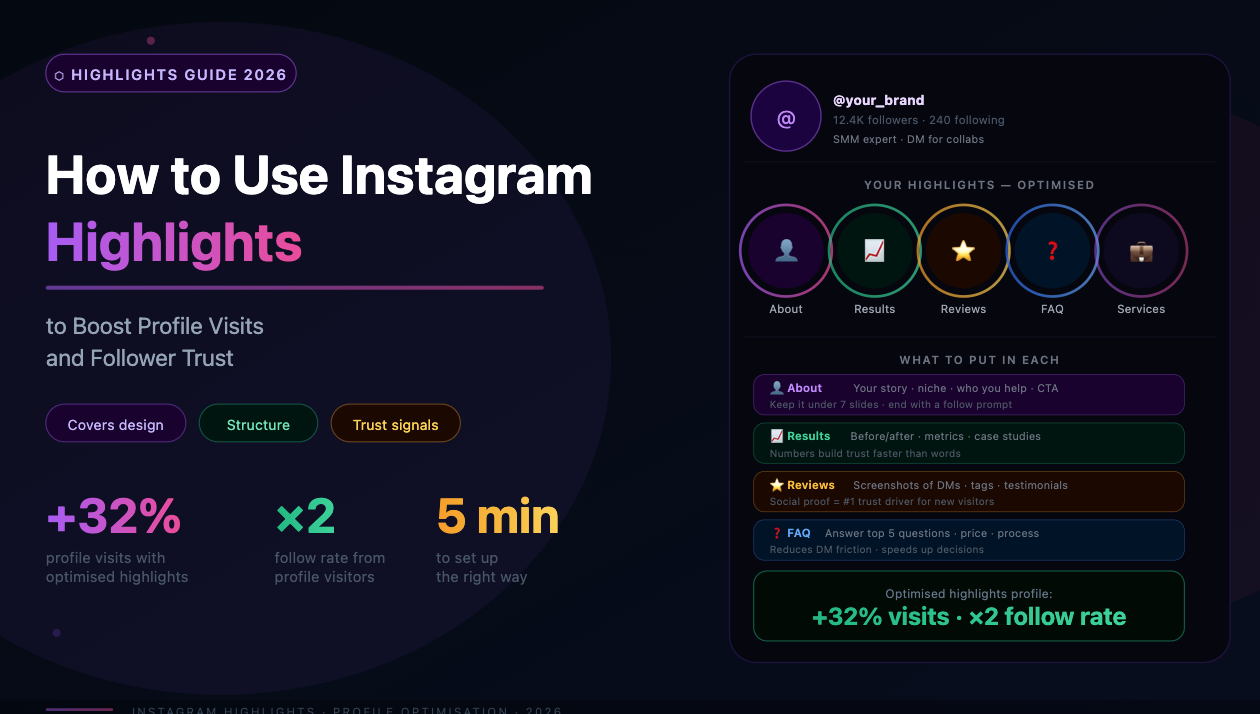
Most Instagram accounts treat Highlights as an afterthought — a place to archive old Stories with auto-generated covers. The result is a profile section that looks cluttered, communicates nothing, and does nothing for conversions.
Used strategically, Highlights serve as a permanent introduction to an account. They answer the questions new visitors ask before deciding to follow: What does this account cover? Is this person or brand credible? Why should I stay? This guide covers how to build Highlights that convert profile visitors into followers — and why audience quality determines whether that investment pays off.
What Highlights Actually Do for Your Profile
When someone lands on an Instagram profile for the first time — through a Reel recommendation, a hashtag search, or a shared link — they spend an average of 8–15 seconds deciding whether to follow. The bio handles the first impression, but Highlights answer the follow-up questions.
Highlights occupy the prime real estate between the bio and the feed grid. They are visible on every profile visit, they are interactive, and unlike the feed, they can be organized thematically. An account with well-structured Highlights communicates authority and intentionality — signals that increase follow rates among first-time visitors.
The secondary function is trust-building for returning visitors. Existing followers who check a profile before making a purchase or booking a call often look at Highlights to verify legitimacy: testimonials, past work, process explanations, FAQs.
The Most Effective Highlight Categories
The right categories depend on account type, but several structures consistently perform well:
For Personal Brands and Creators
For Business Accounts
Cover Design: What Works and What Doesn't
Highlight covers are the first visual element visitors notice before clicking into any specific Highlight. Generic auto-generated covers (random frames from Stories) communicate that the account is unmanaged. Custom covers communicate intentionality.
Effective cover design follows three principles:
Covers can be created in Canva, Adobe Express, or any design tool that allows transparent PNG exports at 1:1 ratio. The optimal dimensions are 1080 x 1080 pixels.
How to Structure Stories That Work as Highlights
Not every Story is worth saving to a Highlight. Stories that were designed for ephemeral engagement — polls, countdown timers, trending audio overlays — lose their purpose outside the 24-hour window.
Stories worth archiving in Highlights share several characteristics:
The Audience Quality Problem and Why It Affects Highlights
Highlights do not have public view counts visible to other users, but they do have internal analytics. More importantly, the accounts that interact with Highlights — tapping, replying, swiping through — feed back into Instagram's engagement signals.
When a large proportion of an account's followers are inactive or bot accounts, Highlights receive fewer interactions per viewer. This reinforces the algorithm's assessment that the account produces low-engagement content — which then suppresses reach across all formats, including Stories that feed the Highlights.
The pattern: accounts with inflated follower counts from old follow-for-follow campaigns, purchased followers, or accumulated ghost accounts see their Highlight interaction rates drop over time. The content and cover design can be perfect, but the underlying audience quality determines how many real people engage.
Addressing this requires removing followers that are no longer active or were never genuine. SpamGuard identifies ghost followers, bot accounts, and inactive profiles through behavioral analysis — posting frequency, login recency, engagement history — and removes them in safe batches.
After cleanup, the remaining audience is smaller but genuinely interested. Highlight interaction rates improve, and the signals Instagram receives about the account's quality improve alongside them.
Run a free follower quality audit at SpamGuard to understand how much of your current audience is actively watching content.
How Many Highlights to Maintain
More is not better. Profiles with 12 or more Highlights create visual overwhelm — visitors do not know where to start and often skip the section entirely.
The optimal range for most accounts is 4–7 Highlights. This number is scannable in a single glance, covers the core categories without redundancy, and is maintainable over time.
Highlights that have not been updated in over six months should be reviewed. Outdated testimonials, discontinued products, or expired offers reduce trust rather than building it.
Practical Steps to Audit and Rebuild Highlights
Conclusion
Highlights are a permanent conversion asset on every Instagram profile. They answer the questions new visitors ask before following, and they provide ongoing trust signals for existing followers. The difference between a Highlights section that converts and one that is ignored comes down to intentional structure, consistent visual design, and an audience that is genuinely interested enough to engage.
If your Highlights are well-designed but interaction rates remain low, the underlying issue is likely audience quality. SpamGuard's follower audit identifies inactive and bot accounts that suppress engagement. Start the analysis for free at spamguardapp.com.
