

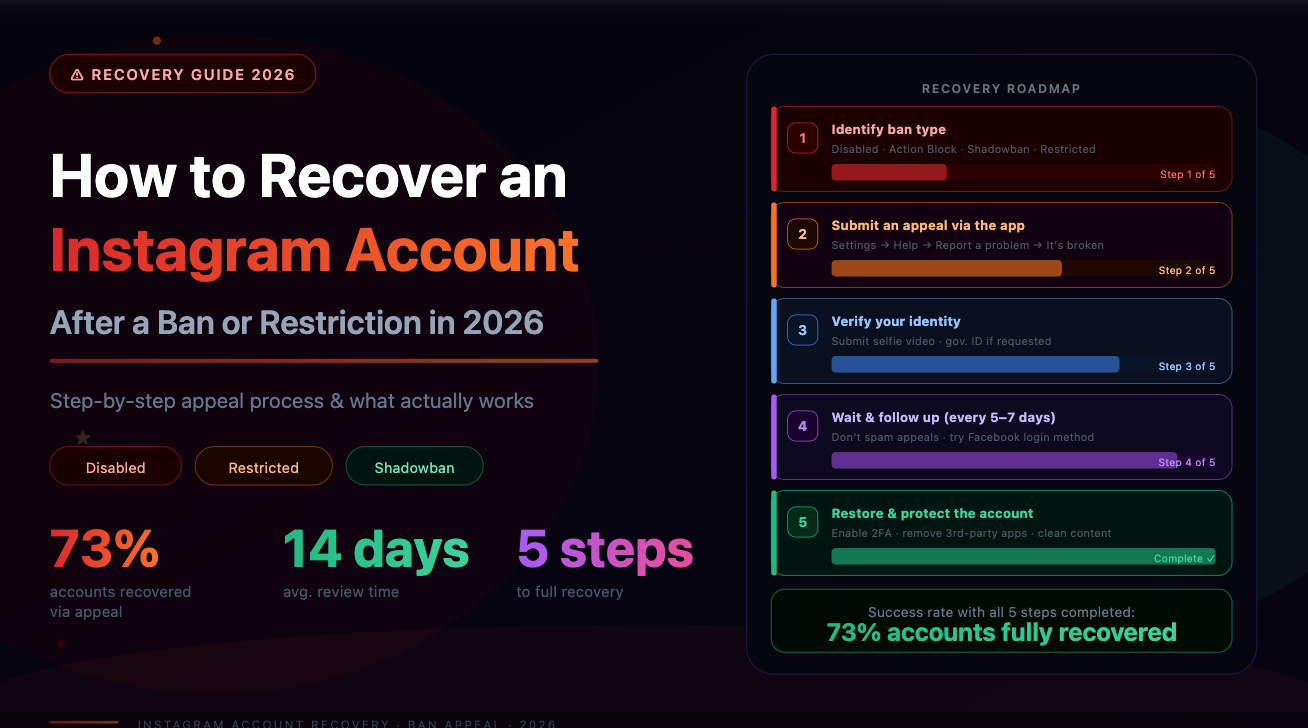
Instagram bans and restrictions fall into several distinct categories, each with a different recovery path. Most account owners who get restricted or banned do not know which type of action was applied — and as a result, they either appeal the wrong way, wait when they should act, or make changes that prolong the problem.
This guide explains the main types of bans and restrictions Instagram applies in 2026, their causes, and the correct recovery process for each — including long-term steps that reduce the chance of a repeat.
Types of Restrictions and Bans
Instagram applies several layers of account action, ranging from temporary feature limits to permanent disabling:
Misidentifying which action has been applied leads to wasted effort. The first step is always diagnosis.
Step 1: Identify Which Restriction Is Active
Log into the account and navigate to Settings > Account > Account Status. This page, introduced in 2022 and significantly expanded in 2024, now shows:
If Account Status shows no restrictions but reach is significantly below normal, this points to an algorithmic suppression rather than a formal restriction. This is typically what people call a 'shadowban' — and it has a different root cause than a formal policy-based restriction.
Step 2: Understand Why the Restriction Was Applied
Instagram applies restrictions based on several signals:
Behavioral signals (actions taken on the account):
Most action blocks come from one of these behaviors — either performed directly or through a connected third-party service.
Audience quality signals:
These signals trigger Instagram's fraud detection systems, which then suppress distribution even when the account holder has not personally done anything against the rules. The account gets flagged because of its audience composition.
Step 3: Appeal a Formal Restriction
For formal policy violations — content removal, account disable, or a noted restriction in Account Status — follow this process:
For permanent disables, the appeal window is 30 days from the date of action. After 30 days, the account and its data are deleted and recovery is no longer possible.
Step 4: Recover From a Shadowban
A shadowban — reduced reach without formal notification — does not have an appeal process because it is not a formal action. Recovery requires addressing the underlying signals that triggered the suppression:
Most shadowbans lift within 2–3 weeks if behavioral triggers are removed.
The Audience Quality Factor in Restrictions
One under-addressed cause of both shadowbans and formal restrictions is audience composition. Accounts with a high proportion of bot or spam followers attract automated reports and trigger Instagram's fraud signals — even when the account owner is not engaged in any policy-violating behavior.
This happens because Instagram's spam detection monitors interaction patterns across the platform. When a large number of bot accounts interact with a specific profile, the profile itself becomes associated with spam activity in Instagram's systems.
Removing flagged followers resolves this signal. SpamGuard identifies bot followers, inactive accounts, and spam profiles through behavioral analysis, and removes them in batches that stay within Instagram's guidelines. Accounts that address their follower base quality typically see their algorithmic suppression lift 2–4 weeks after cleanup — faster than waiting for Instagram's systems to re-evaluate organically.
Run a free follower audit at SpamGuard to identify whether audience quality is contributing to reach problems.
Long-Term Protection Against Repeat Restrictions
Once an account is restored, several practices reduce the risk of future restrictions:
Conclusion
Recovering from an Instagram ban or restriction requires identifying the specific type of action applied, using the correct appeal channel for formal restrictions, and addressing the behavioral or audience quality signals that triggered the issue. Waiting without addressing the root cause rarely resolves the problem — and in the case of shadowbans, does nothing.
Audience quality is a frequently overlooked factor. Accounts with significant bot or spam followers attract automated penalties that persist regardless of how carefully the account owner behaves. Cleaning the follower base is often the fastest path to restored reach.
SpamGuard helps remove problematic followers safely and efficiently. Analyze your account for free at spamguardapp.com.
